
Satisfies 1 requirement
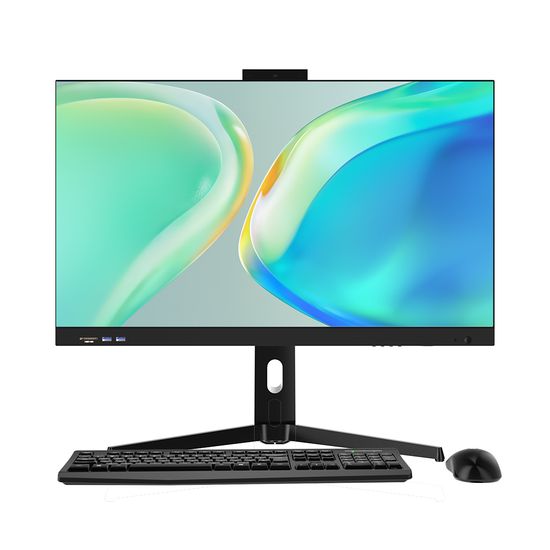
23.6 " Laptops Core CPU I3 I5 I7 Business PC OEM ODM All in One Computer Gamer for Office
US$185.00-198.00
1 Piece(MOQ)

I have found results from200000+products and90000+suppliers aboutOem computer



Selecting the right hardware depends on the target market. For office workstations, prioritize Intel Core i5/i7 or AMD Ryzen 5/7 processors paired with at least 16GB DDR4/DDR5 RAM and NVMe SSDs for speed. For industrial applications, focus on fanless designs, wide temperature tolerance, and rich I/O ports (COM, LAN, GPIO). Always ensure the Power Supply Unit (PSU) has an 80 PLUS certification to guarantee energy efficiency and system stability.
Compliance is non-negotiable in electronics. For the US market, ensure products are FCC certified and meet UL or ETL safety standards. For the European Union, CE marking and RoHS/REACH compliance (restricting hazardous substances) are mandatory. If selling in Canada, look for IC (Industry Canada) marks. Always request valid test reports from accredited third-party labs like SGS or TUV to avoid customs seizures.
Quality control should involve a 48-hour burn-in test to identify early component failures. Verify that the supplier uses Tier-1 brand components (e.g., Samsung/Kingston for memory, ASUS/Gigabyte for motherboards) unless otherwise specified. Request a Mean Time Between Failures (MTBF) report and ensure the assembly facility follows ISO 9001 quality management systems and ESD (Electrostatic Discharge) protection protocols during production.
Beyond hardware, discuss BIOS/UEFI logo customization, custom chassis branding (silk-screen printing or laser engraving), and tailored packaging designs. For software, confirm if the supplier can pre-install specific OS versions (Windows Pro, Linux, or ChromeOS) and inject digital product keys (DPK) into the BIOS to prevent activation issues for end-users.
Implement a Pre-Shipment Inspection (PSI) by a third-party agency. They should perform a Functional Test on a random sample (based on AQL standards) to check boot-up, port functionality, and spec verification. Never release the final 70% payment until the inspection report is approved.
In the electronics industry, component price volatility (especially CPUs and RAM) is common. Negotiate a price validity period (usually 1-2 weeks). For MOQs, if you cannot meet the standard 50-100 units, offer to pay a customization surcharge for a smaller trial run. Mention your intent for long-term partnership and future scaling on Made-in-China.com to gain leverage.
Computers are fragile and sensitive to static/moisture. Insist on professional export packaging, including anti-static bags, thick EPE foam corner protectors, and double-walled corrugated boxes. For large orders, use palletized shipping with shrink wrap to minimize handling damage. Ensure the Incoterms (e.g., FOB or CIF) are clearly defined in the contract.
Use secure payment methods such as Escrow services or Letters of Credit (L/C) for large volumes. Conduct thorough supplier audits via Made-in-China.com to verify their 'Audited Supplier' status, which confirms their business license, production capacity, and physical existence through on-site checks.